How to Hide Your IP Address Online: The Ultimate Privacy Guide

In today's highly interconnected digital landscape, your public IP address functions as your digital footprint. Every website you visit, every application you use, and every file you download reads this address to deliver content. But with this convenience comes a significant trade-off: advertisers, trackers, and sometimes even malicious actors can trace your geographic location, Internet Service Provider (ISP), and browsing habits. Hiding your IP address is no longer a niche practice for the ultra-paranoid; it is a critical step in preserving your online anonymity and digital security.
Privacy Reality Check
- ISPs in many countries are legally permitted to log and sell your browsing history.
- Over 85% of websites use third-party trackers that profile your IP address across the web.
- Over 1.2 billion users worldwide now use VPNs or proxies to mask their identities.
Why Should You Hide Your IP Address?
Before diving into the "how," it's important to understand the "why." Your IP address doesn't reveal your name or exact street address, but it reveals enough to compromise your privacy.
- Preventing Geographic Tracking: Your IP address reveals your city, region, and ISP. By masking it, you prevent websites from geo-locating you.
- Bypassing Geo-Restrictions: Many streaming services, news websites, and applications restrict content based on your region. Changing your IP allows you to bypass these digital borders.
- Avoiding ISP Throttling: ISPs sometimes slow down your connection if they detect heavy bandwidth usage like streaming or gaming. Hiding your IP and encrypting your traffic stops them from analyzing your activities.
- Enhancing Security on Public Wi-Fi: Open Wi-Fi networks in cafes or airports are breeding grounds for hackers. Masking your IP and encrypting traffic prevents local eavesdropping.
Method 1: Use a Virtual Private Network (VPN)
A Virtual Private Network (VPN) is universally considered the most reliable, secure, and user-friendly way to hide your IP address.
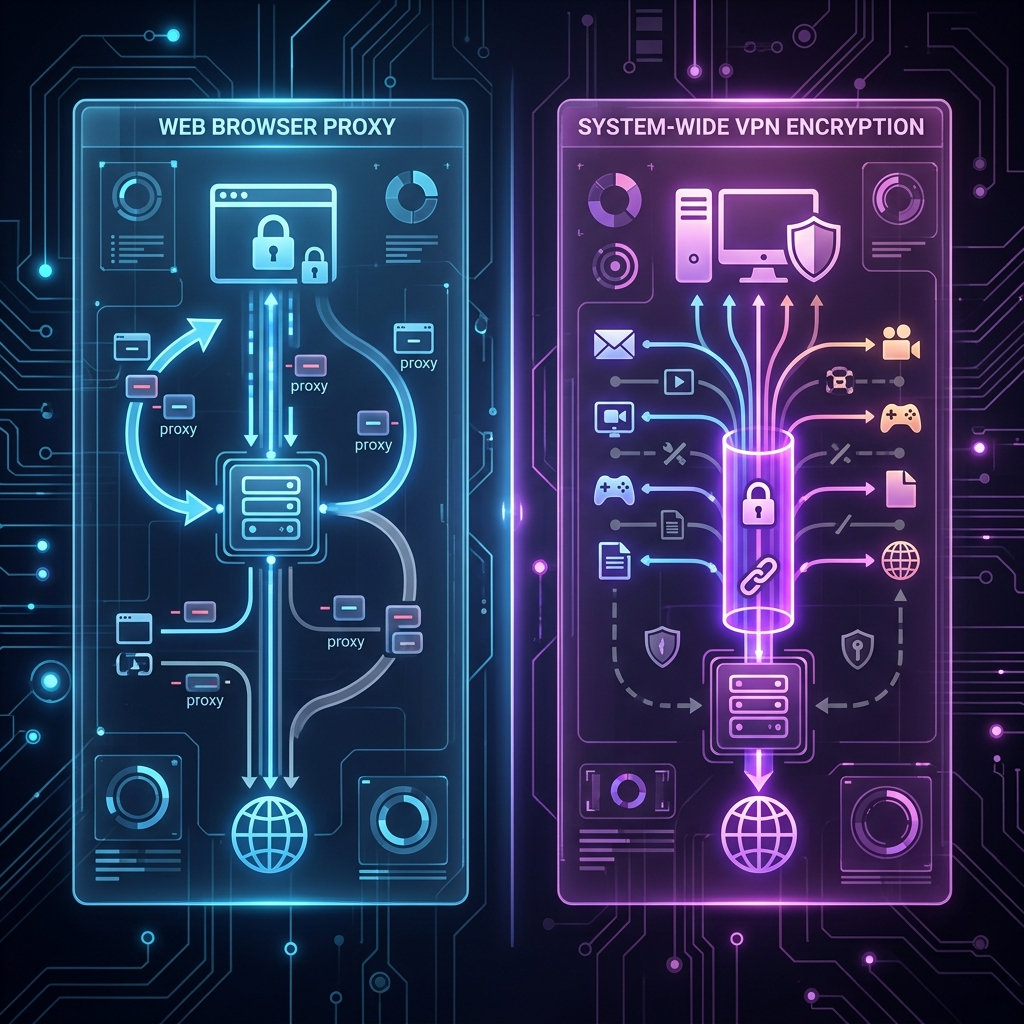
When you connect to a VPN, it creates a secure, encrypted "tunnel" between your device and a remote server operated by the VPN provider. Your internet traffic flows through this tunnel. When your data exits the VPN server and reaches the website you're visiting, the website sees the IP address of the VPN server, not your actual IP address.
Quick Question
Do you currently use a VPN?
Pros and Cons of using a VPN
Pros: High-level encryption (usually AES-256), completely masks your traffic from your ISP, protects the entire device (not just the browser), and allows you to choose server locations globally.
Cons: Quality VPNs cost money (free ones often sell your data), and they can slightly reduce your internet speed due to the encryption overhead.
Method 2: Use a Proxy Server
A proxy acts as an intermediary server between your browser and target websites. It masks your IP address by intercepting your requests and sending them on your behalf. Unlike a VPN, standard proxies typically do not encrypt your data. If you are choosing between the two, read our guide comparing proxy vs VPN to understand the profound safety implications.
Proxies operate at the application level. This means you configure your web browser (or a specific app like a torrent client) to use the proxy. Your other apps will still use your real IP address. Proxies are great for lightweight tasks, such as bypassing a simple workplace firewall or accessing a region-locked news article, but they are not suitable for sensitive tasks like online banking.
Method 3: Use the Tor Network
Tor, which stands for "The Onion Router," is a free, open-source software project that routes your internet traffic through a worldwide volunteer overlay network consisting of thousands of relays.
When you use the Tor browser, your data is wrapped in multiple layers of encryption (like an onion). As the data passes through each node in the network, a single layer of encryption is peeled away to reveal the next destination. Because no single node knows the complete path from the origin to the destination, it makes it nearly impossible to trace your physical location or IP address back to you.
Pros and Cons of Tor
Pros: Absolute anonymity, free to use, highly resistant to censorship and tracking.
Cons: Extremely slow browsing speeds (unsuitable for streaming or downloading large files), some websites block traffic from known Tor exit nodes, and it can attract unwanted attention from ISPs in strict regions.
Method 4: Ask Your Internet Service Provider (ISP)
If you're dealing with a persistent IP ban or targeted harassment, you can simply ask your ISP to change your IP address. Most residential internet connections use dynamic IP addresses, meaning your ISP assigns them from a pool of available addresses. Sometimes, simply unplugging your modem for several hours (or overnight) will result in your ISP assigning you a new IP address when you reconnect.
Interactive Comparison: Which Method is Best for You?
Use the interactive table below to compare the features of VPNs, Proxies, and Tor based on your specific needs.
| Feature | VPN | Proxy | Tor |
|---|---|---|---|
| Hides IP Address | Yes | Yes | Yes |
| Encrypts Data | Yes (Strong) | No | Yes (Multiple layers) |
| Speed | Fast to Moderate | Fast | Very Slow |
| Best Use Case | Overall privacy, streaming, public Wi-Fi | Quick geo-unblocking (low stakes) | Maximum anonymity, whistleblowing |
Frequently Asked Questions
Can I use Incognito Mode to hide my IP?
No. Incognito mode only prevents your browser from saving your local browsing history and cookies. Your ISP, employer, and the websites you visit can still see your real IP address.
Is hiding my IP address illegal?
In most democratic countries, using a VPN or proxy to hide your IP address is completely legal. However, if you use these tools to commit cybercrimes, the acts themselves remain illegal.
Do free VPNs actually work?
While free VPNs will change your IP address, they often come with severe limitations like data caps, slow speeds, and intrusive ads. More concerningly, many free VPNs have been caught logging user data and selling it to third parties, which defeats the purpose of using a VPN.
Related Articles